How Does a Learning Management System Work? A Complete Guide
A learning management system (LMS) brings the different parts of digital learning into one organized environment. Instead of keeping courses, learning materials, assignments, assessments, grades, progress records, and communication in separate places, an LMS connects them through a structured workflow.
But how does a learning management system work in practice?
The process usually begins when an administrator creates user accounts and assigns roles or courses. Teachers then organize learning content, lessons, activities, and assessments. Students access their assigned courses, complete learning activities, submit work, and take assessments. The LMS records relevant learning activity, updates progress, manages grades, and makes information available to teachers and administrators through dashboards and reports.
In other words, an LMS is not simply a website where students watch lessons. It works as a central system for organizing, delivering, monitoring, and improving the learning process.
If you're starting with the fundamentals, see our guide to what is an LMS and what LMS stands for before going deeper into how the system operates.
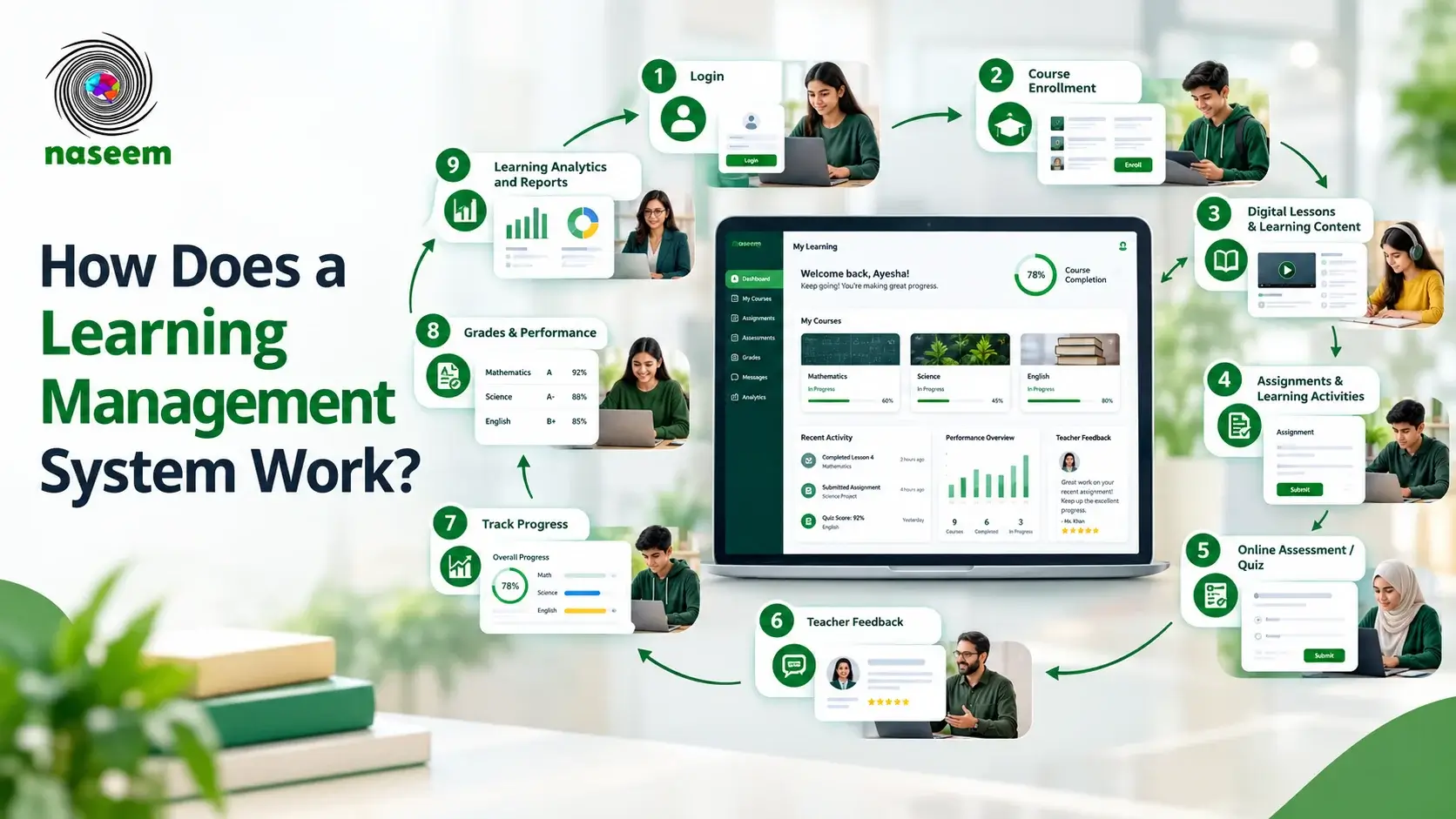
How Does a Learning Management System Work?
At its simplest, an LMS connects users, learning content, activities, assessments, and learning data inside one platform.
A typical learning management system workflow looks like this:
Each stage has a specific purpose.
1. Users Log In to the LMS
The first step is user access.
Depending on the institution and the LMS configuration, different users may have different accounts and permissions. Students may access their courses and assignments, teachers may manage lessons and assessments, while administrators may manage users, courses, settings, and institutional reporting.
This is important because an LMS does not normally give every user access to everything. Role-based access helps ensure that each person sees the tools and information relevant to their responsibilities.
For example:
- Students access learning materials, activities, assessments, grades, and progress.
- Teachers access course-management and assessment tools.
- Administrators manage users, courses, permissions, and reporting.
- Parents may receive visibility into a student's academic progress where the platform supports parent access.
A modern school-focused LMS can therefore act as a shared environment while still providing different experiences for different users.
2. Users Are Assigned or Enrolled in Courses
Once users have access, the LMS needs to determine what each learner is supposed to study.
This can happen through:
- Administrator enrollment
- Class or group assignment
- Course registration
- Self-enrollment
- Role-based enrollment
- Institutional or academic structure
For example, a school might assign a Grade 8 student to Mathematics, Science, English, and History courses.
The LMS associates the student's account with those courses and gives the learner access to the appropriate content and activities.
This is one of the reasons an LMS application is more than a simple collection of online files. It maintains relationships between users, courses, learning activities, and records.
3. Administrators and Teachers Create Courses
Before students can learn through an LMS, the learning environment needs to be organized.
Teachers or authorized administrators can create courses and structure them into:
- Modules
- Lessons
- Topics
- Learning resources
- Activities
- Assignments
- Quizzes
- Tests
- Discussions
- Other learning experiences
A well-structured LMS course management system allows educators to organize learning in a logical sequence rather than simply uploading unrelated documents.
For example:
This structure helps students understand what they need to learn and what they need to complete next.
4. Learning Content Is Delivered
After a course has been created, the LMS makes its content available to enrolled learners.
Depending on the platform, this may include:
- Text-based lessons
- PDFs
- Documents
- Videos
- Presentations
- Interactive activities
- Assignments
- Quizzes
- Learning resources
This is the content-delivery part of the LMS workflow.
Instead of requiring students to search through emails, messaging applications, cloud folders, or physical documents, the LMS can provide a centralized learning environment.
An online learning management system can also make learning accessible beyond the physical classroom, depending on the platform's device, connectivity, and access capabilities.
However, an LMS does not automatically make learning effective simply because content is available online. Good course design, appropriate learning objectives, teacher involvement, accessibility, and learner support remain important.
UNESCO's digital-learning guidance similarly emphasizes that digital learning platforms should complement teachers and existing education systems rather than simply attempt to replace them.
5. Students Complete Learning Activities
The next stage is active participation.
Students may be asked to:
- Read a lesson
- Watch a video
- Complete an exercise
- Participate in a discussion
- Submit an assignment
- Complete a quiz
- Practice a skill
- Review feedback
The LMS can connect these activities to the course structure and, where supported, track completion or results.
This creates a more organized learning journey.
Instead of:
the process becomes:
That distinction is important when understanding how LMS software works.
6. Students Take Assessments
Assessment is another major part of an LMS.
Teachers can create different types of assessments depending on the learning objective, such as:
- Quizzes
- Tests
- Assignments
- Exams
- Short-answer activities
- Practice assessments
Some assessments can be automatically graded, while others require teacher evaluation.
For example, a multiple-choice quiz may be scored automatically. An essay may require a teacher to review the response and provide feedback.
The result can then become part of the learner's academic record within the LMS.
7. The LMS Records Learning Activity
This is where an LMS becomes much more than a content library.
As learners interact with courses, the system can record relevant information such as:
- Course completion
- Lesson completion
- Assessment results
- Assignment submissions
- Grades
- Learning activity
- Progress status
- Other available performance information
Exactly what gets recorded depends on the LMS and how it is configured.
This information creates a learner record that teachers and administrators can use to understand what has happened during the learning process.
Modern LMS platforms commonly combine activity tracking, completion data, assessment results, and reporting into a centralized environment.
8. Teachers Review Progress and Provide Feedback
Once learning activity and assessment information is available, teachers can review student performance.
They may look at:
- Completed lessons
- Assignment submissions
- Quiz results
- Grades
- Areas of difficulty
- Overall course progress
- Learning activity
This allows educators to provide more targeted feedback.
For example, if several students perform poorly on a particular topic, the teacher may decide to revisit that concept rather than simply moving forward.
This creates a feedback loop:
That feedback loop is one of the most important ways an LMS can support the learning process.
9. The LMS Generates Reports and Learning Insights
The information collected throughout the learning process can be presented through dashboards and reports.
Depending on the platform, reporting may cover:
- Individual students
- Classes
- Courses
- Assessments
- Completion
- Academic performance
- Learning activity
- Institutional trends
Teachers can use these insights to understand individual learners, while school leaders can use broader information to understand patterns across classes or the institution.
A learning management system therefore turns individual learning activity into organized information that can support educational decisions.
10. The Learning Cycle Continues
An LMS workflow doesn't necessarily end when a student completes an assessment.
The information produced during learning can inform what happens next.
A learner may:
- Continue to another lesson
- Repeat an activity
- Receive additional support
- Complete another assessment
- Move to another course
- Follow a different learning path
This produces a continuous cycle:
That is the fundamental answer to how does an LMS work.
How Does an LMS Work for Different Users?
One reason LMS platforms are useful in education is that the same system can serve different users while giving each role different tools and information.
How Does an LMS Work for Students?
For students, the LMS acts as their digital learning environment.
A typical student journey may look like:
Students may use the platform to access:
- Courses
- Lessons
- Learning resources
- Assignments
- Assessments
- Grades
- Feedback
- Progress information
A well-designed LMS can therefore give learners a clearer view of what they need to complete and how they are progressing.
How Does an LMS Work for Teachers?
For teachers, an LMS functions as a teaching and monitoring environment.
Teachers can typically:
- Create courses
- Organize lessons
- Upload learning resources
- Create assignments
- Build assessments
- Review submissions
- Grade work
- Provide feedback
- Monitor progress
- Identify learning gaps
Instead of managing these activities through multiple disconnected systems, an LMS can bring them together.
For schools, this can make the relationship between teaching, assessment, and progress tracking much easier to manage.
How Does an LMS Work for Administrators?
Administrators generally have broader access to the system.
Their responsibilities may include:
- Creating and managing user accounts
- Assigning roles
- Managing courses
- Managing permissions
- Organizing academic structures
- Monitoring platform activity
- Accessing reports
- Managing institutional settings
The administrator essentially manages the environment in which teaching and learning take place.
How Does an LMS Work for Parents?
Some school-focused LMS platforms also provide parent access.
Where supported, parents may be able to see information such as:
- Student progress
- Academic performance
- Achievements
- Assignments
- Areas requiring attention
The purpose isn't necessarily to give parents access to every part of the LMS. Instead, parent access can provide visibility into the aspects of learning that help them support their child.
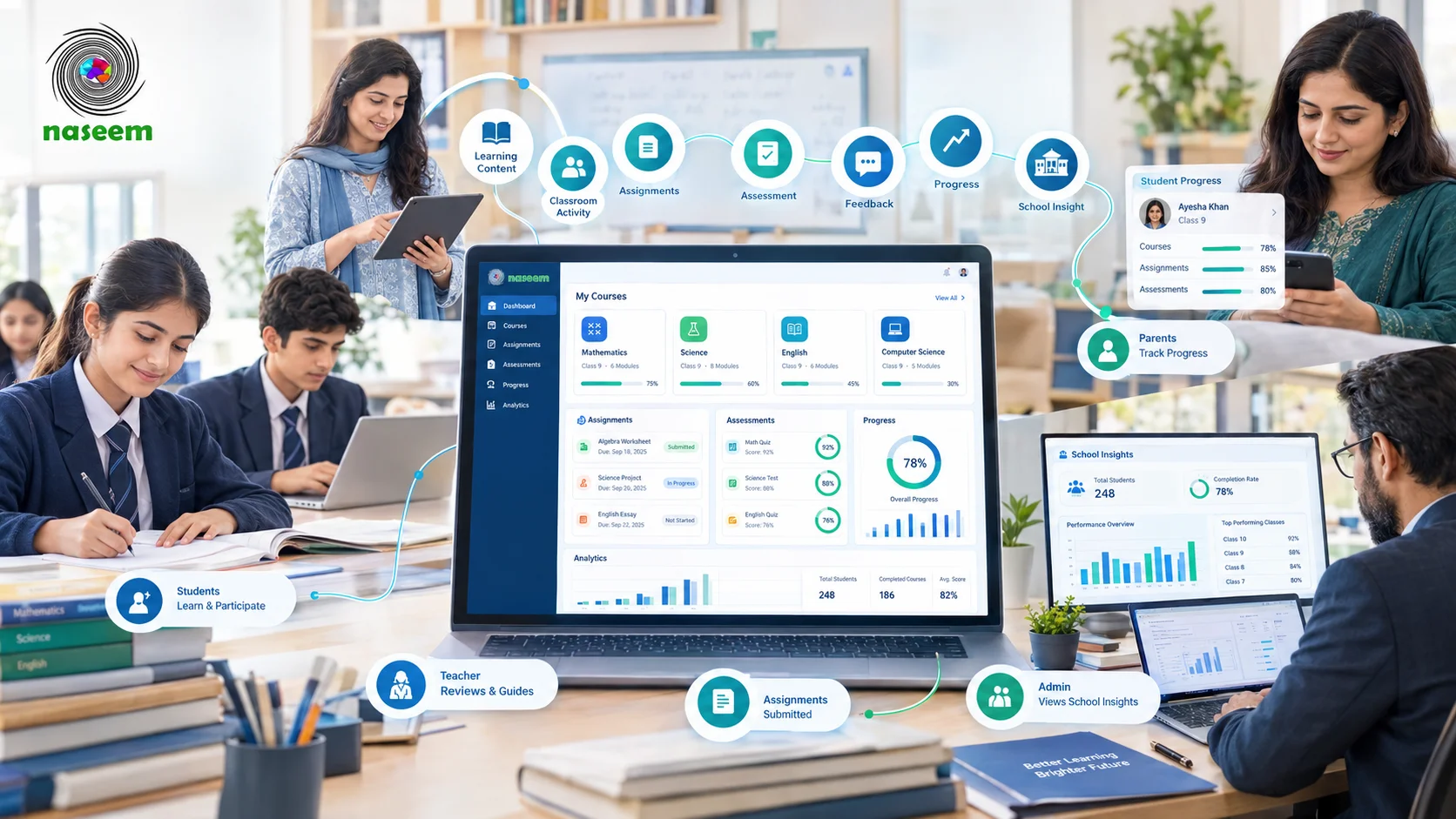
For example, Naseem Education describes a connected learning environment where students, teachers, parents, and school leaders have role-specific experiences within one platform.
How Does an LMS Manage Courses and Learning Content?
Course management is one of the foundational functions of an LMS.
A teacher or administrator can organize learning material into a structured course rather than maintaining disconnected files.
A typical structure could look like:
This structure helps create a predictable learning journey.
Course Creation
The educator establishes the course and its objectives.
Course Organization
Lessons, modules, resources, and activities are arranged into an appropriate sequence.
Content Upload and Management
Educational resources are added to the course.
Learning Activities
Students receive opportunities to practice or apply what they have learned.
Completion Rules
Where supported, the LMS can use completion conditions to determine whether a learner has finished particular activities or course requirements.
The result is a structured learning management system process rather than simply an online folder.
How Does an LMS Handle Assessments and Grading?
Assessment connects learning activity with measurable outcomes.
The process can look like this:
Creating Quizzes and Tests
Teachers can create assessments that evaluate specific learning objectives.
Assignment Submission
Students submit their work through the platform where submission functionality is available.
Automated Grading
Objective questions can sometimes be graded automatically, reducing repetitive work for teachers.
Teacher Grading
Open-ended assignments or other activities may require human evaluation.
Gradebooks
Results can be organized within a gradebook or comparable academic record.
Feedback
Teachers can communicate what students did well and where improvement may be needed.
This combination of assessment, grading, and feedback makes an LMS useful for more than course delivery.
How Does an LMS Track Student Progress?
Student progress tracking is one of the defining functions of an LMS.
The platform can bring together relevant information from different parts of the learning journey.
For example:
| Learning Activity | Possible Progress Information |
|---|---|
| Lesson | Completion |
| Assignment | Submission / status |
| Quiz | Score |
| Course | Overall completion |
| Assessment | Result |
| Learning activity | Participation / activity information |
| Course requirements | Completion status |
The exact information varies between LMS platforms.
The important point is that the LMS creates a centralized picture of learning progress.
This can help teachers answer questions such as:
- Has the student completed the required lesson?
- Has the assignment been submitted?
- How did the student perform on the assessment?
- Is the learner progressing through the course?
- Where might additional support be needed?
For school environments, this information can also support broader academic monitoring.
How Does an LMS Generate Reports and Analytics?
Once the LMS has collected learning information, it can turn that information into reports and dashboards.
Student-Level Reports
These can help educators understand an individual learner's:
- Progress
- Assessment results
- Completion
- Performance
- Areas of difficulty
Course-Level Reports
Teachers can examine how learners are progressing through a particular course.
Class-Level Reports
Educators can identify patterns across a group of students.
School-Level Reports
Administrators and school leaders may review broader academic trends where the LMS provides institutional analytics.
Learning Performance Analytics
Analytics can help turn raw activity into more meaningful information.
For example:
- Raw data: 25 students completed a quiz.
- Useful insight: Most students performed well except for one learning objective where a significant number struggled.
The second type of information is more valuable because it can inform teaching decisions.
What Happens Behind the Scenes in an LMS?
For readers who want to understand the system beyond the visible interface, an LMS can be viewed as several connected layers.
User Management and Authentication
The system identifies users and determines what they are allowed to access.
LMS Database
The platform stores relevant information associated with users, courses, activities, assessments, and progress.
Content Management
The LMS organizes learning materials and makes them available to appropriate users.
Learning Activity Tracking
The system records supported activity and completion information.
Assessment and Grade Management
Assessment results and grades can be connected with the learner's course record.
Reporting and Analytics
The platform turns available learning information into dashboards and reports.
Integrations
Some LMS platforms connect with external systems for functions such as authentication, video conferencing, student information systems, content standards, or other educational services.
The exact technical architecture differs considerably between LMS products, so it would be inaccurate to assume that every platform stores or processes data in exactly the same way.
How Does an Online Learning Management System Work?
An online learning management system allows learning activities to be delivered through a connected digital environment.
Instead of requiring learners and teachers to be physically present in the same location for every activity, users can access the platform remotely where supported.
A typical online LMS can provide:
- Web-based course access
- Digital learning materials
- Online assignments
- Digital assessments
- Progress tracking
- Feedback
- Reporting
- Communication
This can support online, blended, and technology-supported classroom learning.
However, online does not automatically mean better. The quality of the learning experience still depends on course design, teaching, learner support, accessibility, infrastructure, and how effectively the technology is used.
UNESCO's digital education guidance emphasizes inclusive, accessible, teacher-led, and complementary digital learning environments.
How Does an LMS Work in a School?
A school LMS brings the general LMS workflow into an academic environment.
A typical school workflow can look like this:
Let's look at it more closely.
School Creates Users
Students, teachers, administrators, and potentially parents receive appropriate accounts or access.
Teachers Organize Courses
Teachers create or manage their digital course environments.
Students Access Learning
Students see the courses and learning activities available to them.
Teachers Deliver Learning
Lessons, resources, assignments, and activities are provided through the platform.
Students Complete Assessments
Learners complete quizzes, assignments, or other assessments.
Teachers Review Performance
Educators examine results and provide feedback.
Progress Is Recorded
The LMS maintains relevant progress and performance information.
School Leaders Review Insights
Where institutional analytics are available, leaders can review broader patterns across the school.
This makes an LMS particularly useful when a school wants to connect teaching, learning, assessment, and academic visibility rather than simply put documents online.
How Naseem Education Puts the LMS Workflow Into Practice
A practical way to understand how an LMS works in a school is to look at how a school-focused platform applies the workflow.
Naseem Education's Learning Management System brings course management, learning delivery, assessments, progress tracking, analytics, communication, and personalized learning into one connected environment.
School and User Setup
The first requirement is a connected environment in which different members of the school community can access the tools relevant to their roles.
Naseem Education is designed around four key groups:
- Students
- Teachers
- Parents
- School leaders
Each group interacts with the learning environment differently.
Course Organization
Teachers need a structured environment for managing learning activities, content, and assessments.
Naseem Education positions its LMS around centralized course and learning management rather than treating digital content as a standalone repository.
Learning Delivery
Students can access learning experiences, interactive content, activities, assessments, and feedback through the platform.
This creates a connected journey rather than forcing learners to move between unrelated tools.
Assessment
Assessment provides information about what students have understood and where additional support may be needed.
Naseem Education includes assessment and feedback capabilities as part of its broader LMS workflow.
Progress Tracking
Progress information can help teachers understand how individual students are developing.
Rather than looking only at a final grade, a connected learning environment can bring together relevant activity and performance information to provide a broader view of the learning journey.
Parent and School Visibility
Parents may need a different perspective from teachers.
Naseem Education describes parent visibility around areas such as progress, performance, achievements, and areas requiring additional attention.
School leaders, meanwhile, can use broader information to understand institutional learning trends.
Learning Insights
The final stage is turning learning information into useful insight.
Naseem Education describes learning analytics as a way for educators and school leaders to understand progress, identify areas of difficulty, monitor trends, and make more informed academic decisions.
For schools interested in how this type of platform works in practice, the Naseem Education LMS overview provides a more detailed look at its learning, assessment, progress, and analytics approach.
What Are the Main Components of an LMS?
Although LMS platforms differ in design and functionality, the following components are common across many systems:
| LMS Component | What It Does |
|---|---|
| User Management | Manages learners, teachers, administrators and roles |
| Course Management | Organizes courses, modules and lessons |
| Content Delivery | Makes learning materials available to learners |
| Assessments | Supports quizzes, tests and assignments |
| Gradebook | Organizes grades and assessment results |
| Progress Tracking | Monitors learning completion and activity |
| Communication | Supports relevant learner-teacher interaction |
| Reporting | Produces learning and performance reports |
| Analytics | Helps identify patterns and trends |
| Integrations | Connects the LMS with other systems where supported |
These components work together rather than operating as completely separate tools.
That integration is what turns LMS software into a learning management system rather than simply an online content repository.
What Happens When a Student Completes a Course?
Course completion generally follows a sequence like this:
- The student completes required lessons or activities.
- The LMS records relevant completion information.
- Required assessments are completed.
- Results and grades are recorded where applicable.
- The system evaluates applicable completion requirements.
- The learner's progress is updated.
- Completion information becomes available through the relevant reporting or learner interface.
- The student can move to the next learning stage where the course structure allows it.
Not every LMS uses identical completion rules. Some may require specific activities, scores, or milestones before marking a course complete.
The important concept is that completion can be based on defined learning requirements rather than simply opening a course page.
What Are the Benefits of an LMS Workflow?
The value of an LMS comes from connecting the different stages of learning.
Centralized Learning Management
Courses, activities, assessments, and progress can be managed within one environment.
Easier Course Delivery
Teachers can organize learning resources and make them available to enrolled learners.
More Consistent Assessment
Digital assessment workflows can make it easier to create, distribute, evaluate, and record certain types of assessments.
Better Progress Visibility
Teachers can gain a clearer picture of learner activity and performance.
Faster Feedback
Digital workflows can help teachers provide feedback more efficiently.
More Organized Teaching
A structured LMS reduces the need to manage every learning component across disconnected systems.
Data-Informed Academic Decisions
Reports and analytics can help educators identify patterns and areas where students may need additional support.
Better School Connectivity
School-focused LMS platforms can connect students, teachers, parents, and school leaders through a shared environment.
The goal should not be to automate education for its own sake. Instead, technology should make it easier for people to teach, learn, assess, communicate, and make informed decisions.
LMS Workflow Example: From Enrollment to Completion
Here is the entire process in one view:
For example, imagine a student enrolled in a mathematics course.
The student logs in and opens the assigned course. They study a lesson about algebraic equations, complete a practice activity, and submit an assignment. They then take a quiz. The LMS records the result, while the teacher reviews the performance and provides feedback.
If the student struggles with a particular concept, the teacher can provide additional support or learning material.
The process therefore becomes:
That is the practical meaning of an LMS workflow.
How Is an LMS Different From a Traditional Learning Process?
An LMS does not necessarily replace traditional teaching. Instead, it changes how many learning activities are organized and managed.
| Traditional Learning | LMS-Based Learning |
|---|---|
| Physical learning materials | Digital learning resources |
| Manual progress records | Centralized progress records |
| Paper-based assessments | Digital assessments where supported |
| Manual grade tracking | Digital grade management |
| Limited visibility between activities | Connected learning records |
| Separate communication channels | Integrated communication where supported |
| Manual reporting | Automated or semi-automated reporting |
| Classroom-centered access | Online or blended access |
The difference is therefore not simply physical vs. digital.
The larger difference is disconnected processes vs. a connected learning workflow.
A school can still use classrooms, teachers, textbooks, face-to-face discussions, and traditional assessments while using an LMS to organize and support the digital components around them.
Final Takeaway
So, how does a learning management system work?
An LMS works by connecting the major stages of learning inside one structured environment:
For students, it provides an organized way to access and complete learning. For teachers, it brings course management, assessment, feedback, and progress monitoring together. For administrators and school leaders, it can provide broader visibility into learning activity and outcomes.
The most important point is that an LMS is not simply an online place to upload courses. Its real value comes from connecting learning content with people, activities, assessments, records, feedback, and progress.
For schools evaluating a modern platform, Naseem Education's learning management system provides one example of how these pieces can be connected around students, teachers, parents, and school leaders.
A well-designed LMS ultimately helps create a more organized learning cycle:
Frequently Asked Questions About How an LMS Works
Ready to Bring Your School’s Learning Together?
Give your school a connected learning management system designed to support students, teachers, parents, and school leaders.