
Learning Management System for Schools in Pakistan
Naseem Education is a learning management system (LMS) designed to bring digital learning, assessments, student progress, and teaching activities into one online environment for schools.
Schools can use the platform to organize learning resources, support teachers, give students access to digital learning activities, and help parents stay informed about academic progress. The platform also gives school leaders a central place to review learning information and understand how students are progressing.
If your school is evaluating LMS software in Pakistan, explore Naseem Education's features and request a demo to see how the platform works.
What Is a Learning Management System (LMS)?
A learning management system is software that helps schools organize, deliver, and monitor learning. Depending on its features, an LMS can support course materials, assignments, assessments, feedback, student progress tracking, and communication between members of the school community.
Instead of managing every learning activity through separate documents, messages, and records, a school can use an LMS to organize digital learning in a more consistent way.
For example, a teacher may share learning materials with a class, assign work, review student performance, and use available progress information to identify students who need additional help. Students can access their assigned learning activities, while authorized parents and school leaders can review the information available to them.
Naseem Education brings these learning activities together in an online platform for schools.
How Does Naseem Education's LMS Work?
A learning management system is most useful when teachers, students, parents, and administrators can understand how to use it in their everyday work.
Naseem Education is designed around these different roles, with learning activities and progress information organized within a connected digital environment.
1. Organize Courses and Learning Materials
Teachers need a clear way to organize the materials students use during a course. Naseem Education provides a digital learning environment for organizing course-related resources and activities.
A typical learning workflow begins with a teacher preparing materials for a subject or class. Students then access the resources made available to them through the platform.
2. Assign Work and Assess Student Learning
Assessments help teachers understand whether students have understood a lesson and where further instruction may be needed.
Naseem Education includes assessment-related capabilities intended to support the evaluation of student learning. Teachers can use the available assessment tools to review performance and identify areas that may require additional attention.
The assessment process should be demonstrated using a real teacher account, including the available question types, submission process, marking options, and feedback features.
3. Review Student Progress
Teachers and school leaders need more than a final grade to understand how a student is progressing. Information about learning activity and assessment performance can help them decide where additional support may be appropriate.
Naseem Education is designed to help educators review student progress through the information available within the platform.
For example, a teacher reviewing assessment results may identify a topic that several students have struggled with and decide to revisit it in class. The teacher can then use a follow-up activity to check whether students have improved. Our guide to tracking student progress with an LMS walks through this process step by step.
4. Help Students Access Their Learning
Students need a clear place to find the learning resources and activities assigned to them.
Naseem Education provides an online learning environment through which students can access supported learning activities. The available experience depends on the features enabled for their school and account.
A demonstration should show how students sign in, locate their learning materials, complete an available activity, and view any feedback or progress information provided by the platform.
5. Give Parents Relevant Learning Information
Parents often want to understand how their children are progressing, which assignments need attention, and where additional support may be useful.
Naseem Education is designed to support parent visibility into the learning process through the information made available to authorized users.
The exact information parents can view should be explained clearly. If the parent portal includes assessment results, learning activity, progress reports, or teacher communications, show those features in the product demonstration and describe their availability accurately.
6. Give School Leaders a View of Learning Activity
School leaders need an overview of academic activity to understand where teachers or students may need support.
Naseem Education brings learning-related information into a connected platform intended to help educators and school leaders review progress and make informed decisions.
During a demonstration, show which reports and indicators are available to school administrators, how they are organized, and whether information can be reviewed by class, subject, or another supported category.
Learning Management System Features for Schools
The right LMS depends on the work a school needs to manage. Naseem Education brings together learning and assessment capabilities intended to support students, teachers, parents, and school leaders.
Course Management
Organize learning resources and course-related activities in a digital environment. Show how teachers create or manage courses, arrange learning materials, and make the relevant resources available to students.
Online Learning and Content Access
Give students access to supported learning materials through the web. The product demonstration should explain which content formats are available and how students access assigned resources.
Assignments and Learning Activities
Help teachers organize the learning activities students are expected to complete. Explain how activities are assigned, how students submit their work, and how teachers review submissions, where these features are supported.
Assessments and Grading
Use the available assessment tools to review student learning. Clearly distinguish between automatically graded assessments and work that requires teacher review. Describe the supported question types and grading options accurately.
Student Progress Tracking
Help educators review the learning information available in the platform. Demonstrate the actual progress indicators and explain what each one measures.
Parent Access
Give parents access to the student information made available through their authorized accounts. Explain the available views and how access is managed.
Learning Analytics
Use supported reporting and analytics features to review learning activity and performance. Show real reports and explain how teachers or administrators can use the information in their work.
Access Across Devices
Naseem Education provides a web-based learning environment. Schools should confirm browser compatibility, mobile usability, and any device requirements during the demonstration.
Who Can Use Naseem Education's LMS?
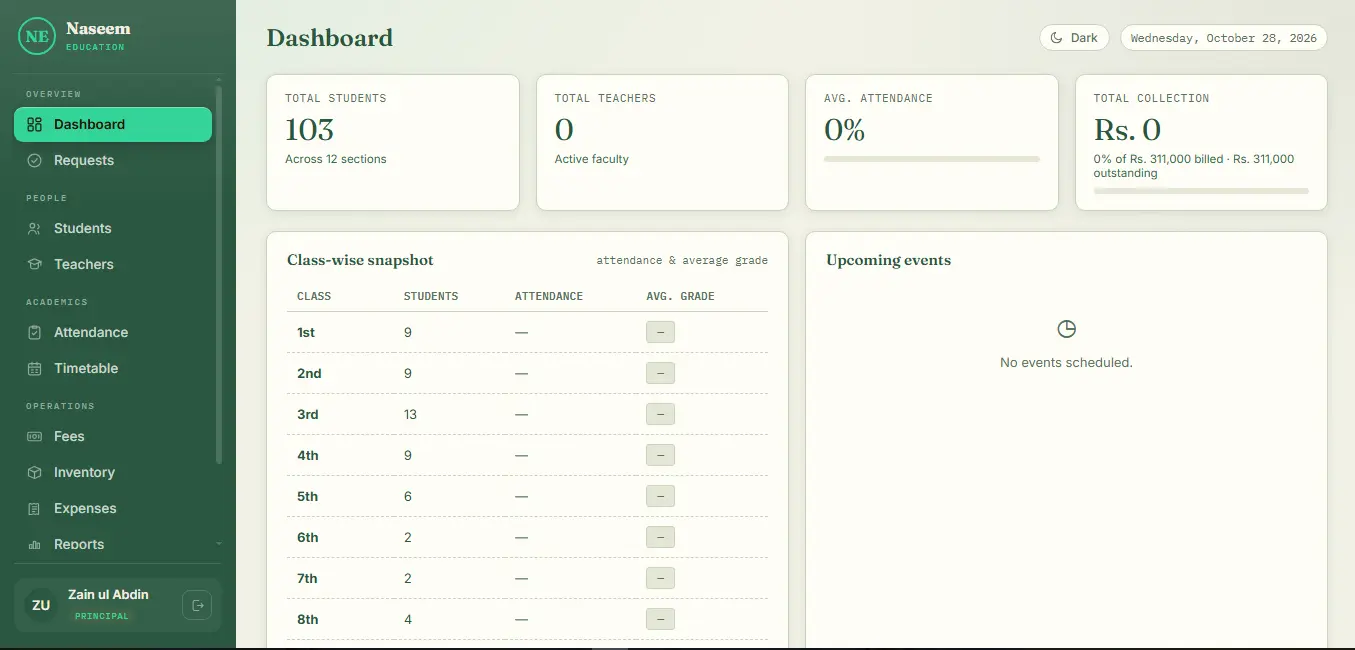
For School Administrators and Principals
School leaders can evaluate the platform as a way to organize digital learning and review the learning information available across their institution.
A demonstration should show the administrative tools available, the reports school leaders can access, and how user access is managed.
For Teachers
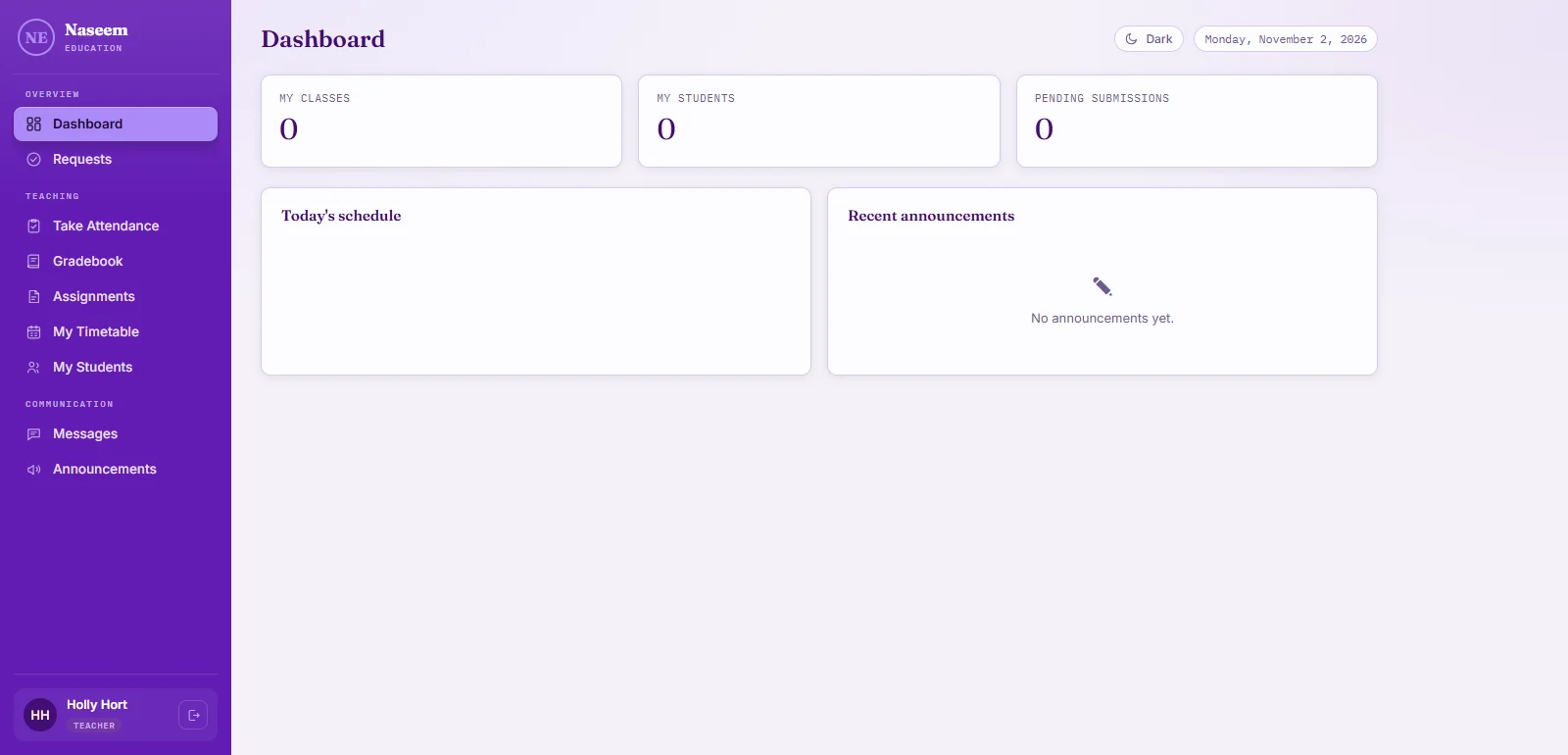
Teachers can evaluate the platform's course, learning activity, assessment, and progress-related tools.
The demonstration should focus on the tasks teachers perform regularly, including preparing learning materials, managing available assessments, and reviewing student performance.
For Students
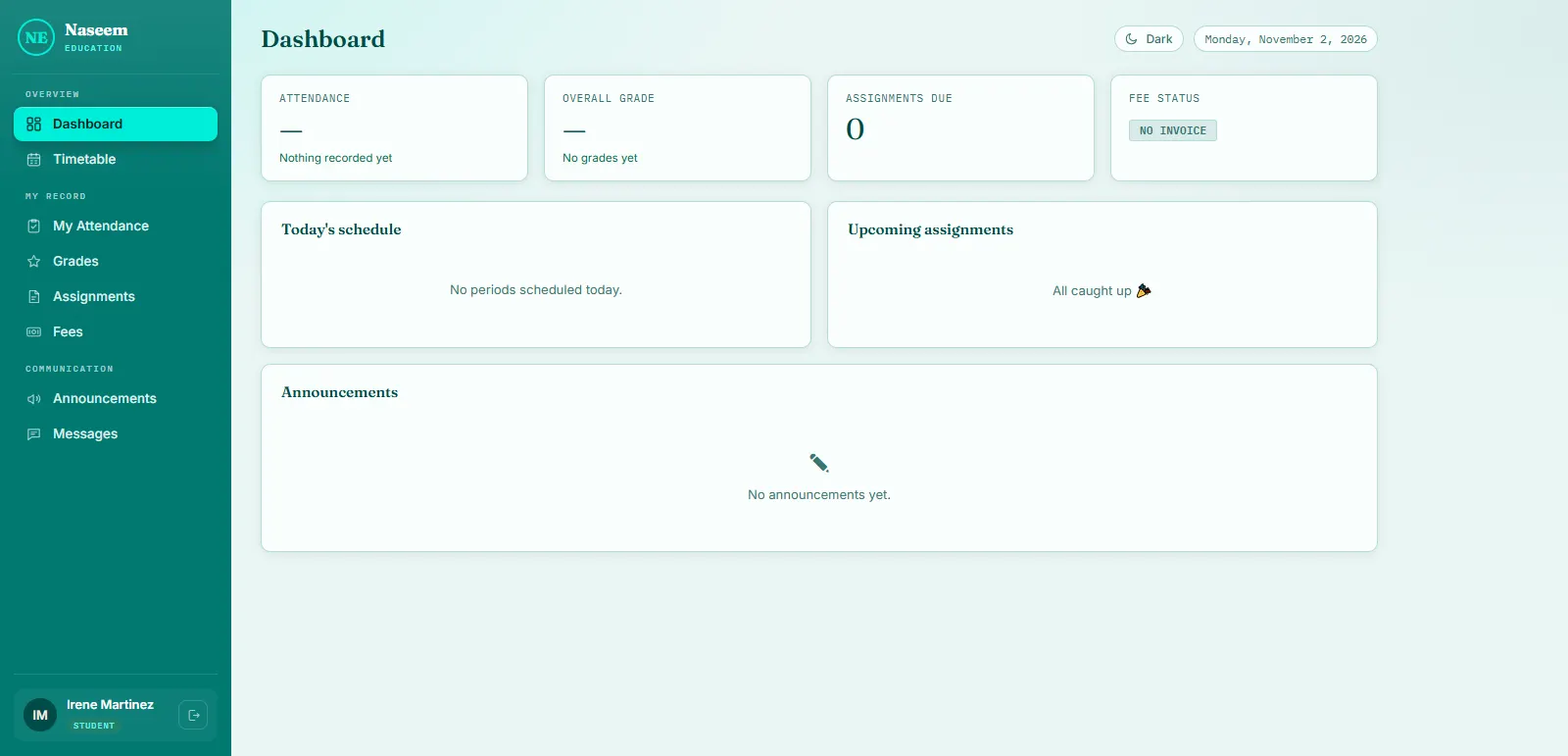
Students can use the learning environment to access the activities and materials made available to them by their school.
The demonstration should show the student view, how students find assigned work, and which feedback or progress information is available.
For Parents and Guardians
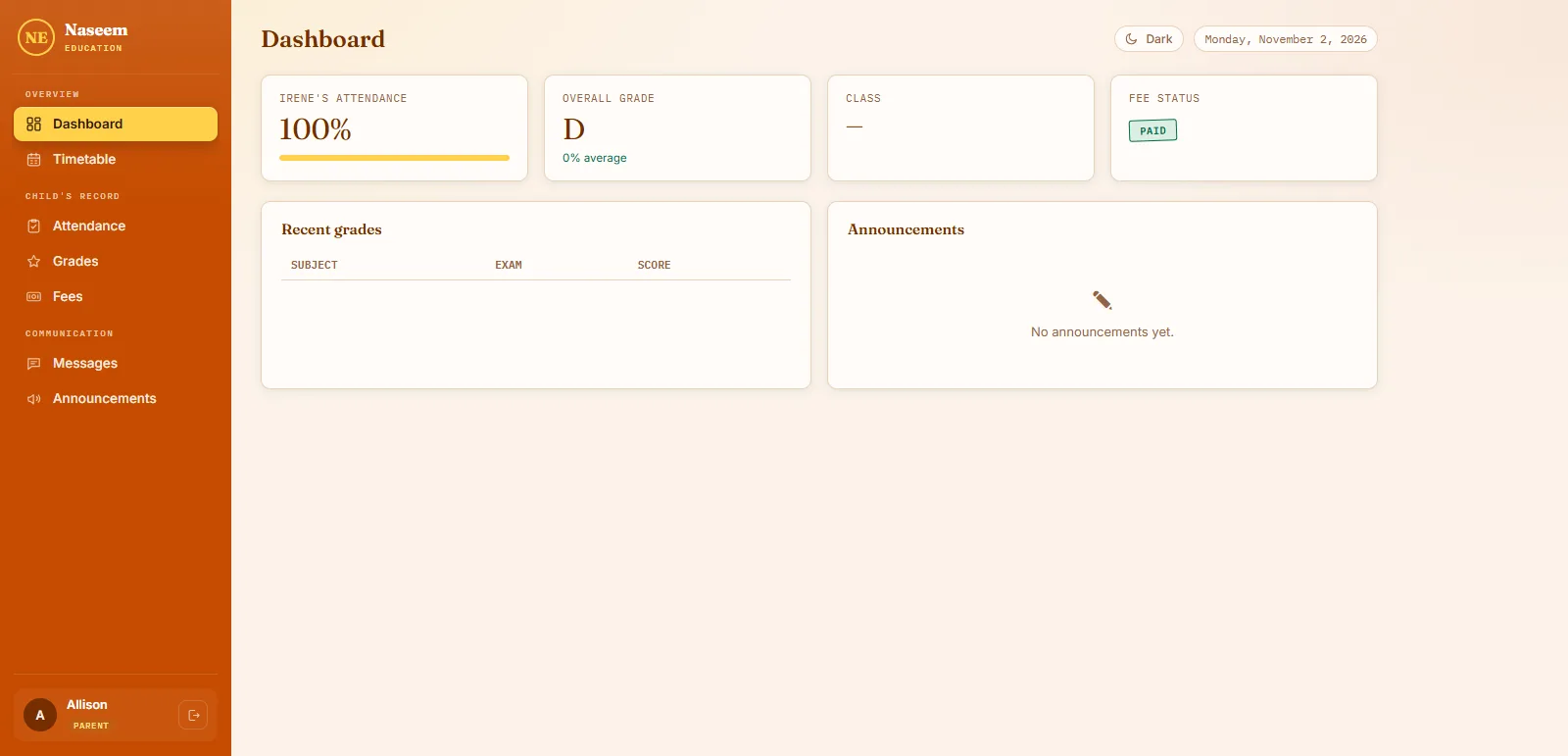
Parents can evaluate the information available through their authorized access to the platform.
Schools should confirm which student records, progress information, and communication features are available to parents before implementation.
Why Consider an LMS for Your School in Pakistan?
Schools in Pakistan vary in size, teaching methods, curriculum, technology access, and administrative requirements. The right learning management system should fit the school's actual teaching and assessment processes.
Before choosing LMS software, consider the following questions.
Does it support your teaching process?
Check whether teachers can organize the required learning materials, assign activities, assess students, and review results using the available features.
Can students access the platform?
Review supported devices, browser compatibility, login requirements, and internet access needs. Confirm whether the platform supports your school's circumstances.
Can parents and school leaders access the right information?
Ask which reports, student records, and learning views are available to each user role.
Is student information handled responsibly?
Review the provider's privacy policy, access controls, data handling practices, and security documentation before uploading student records.
Will teachers receive adequate support?
Ask about onboarding, teacher training, technical assistance, and the process for resolving issues.
Does the platform fit your budget?
Request a quotation and confirm the pricing structure, implementation costs, included services, and ongoing charges before making a decision.
These checks can help your school assess whether an LMS is suitable for its teaching environment rather than choosing software based on a feature list alone.
Student Data, Privacy, and Security
Schools should understand how an LMS handles student information before introducing it into their teaching processes.
Naseem Education publishes a Privacy Policy explaining how information may be collected, used, stored, and shared in connection with its website and learning services.
The policy also describes the role of schools and organizations in managing accounts, permissions, and educational information. Schools should review the policy alongside their own requirements before deciding how to use the platform.
Read Privacy PolicyBefore implementation, ask the Naseem Education team to explain the safeguards relevant to your proposed use, including:
- How user accounts and access permissions are managed.
- Which student and academic information the platform processes.
- How data is retained and what happens when an account is closed.
- Which hosting and service providers are involved, where applicable.
- What backup, recovery, and incident-response arrangements are in place.
- What responsibilities belong to the school and what responsibilities belong to the platform provider.
Answers should be based on the provider's actual technical and operational practices. Schools should not rely on a general claim of security as a substitute for reviewing the relevant documentation.
See How Naseem Education Works
A product demonstration is the best way to evaluate whether the platform fits your school’s needs.
During your demo, ask to see the workflows that matter most to your institution:
- How teachers organize courses and learning resources.
- How students access and complete assigned activities.
- How assessments are created, reviewed, and graded.
- Which progress reports teachers and administrators can access.
- What parents can view through their authorized accounts.
- How user permissions, onboarding, and technical support work.
You can also ask about browser compatibility, mobile access, implementation requirements, pricing, and the support available to your school.
Frequently Asked Questions About LMS in Pakistan
Evaluate Naseem Education for Your School
Choosing a learning management system is a practical decision about how your school will organize learning, assess students, and give teachers and school leaders access to useful information.
Explore Naseem Education’s available features, review the privacy information, and request a demonstration to see whether the platform fits your school’s needs.